
Transformă-ți discursul în text cu AI avansat – Îmbunătățește-ți proiectele individuale cu Alrite

Inteligența artificială de ultimă generație Alrite pentru conversia vorbirii în text transformă fără efort discursul tău în text în {{supportedLanguages}}. AI-ul nostru pentru conversia vorbirii în text face acest lucru cu o precizie remarcabilă pe materiale video și audio. Dacă vrei ce e mai bun, alege Alrite.

Woman using a speech into text application with her phone

Creșteți-vă eficiența cu transformarea vorbirii în text alimentată de AI!

Cu interfața modernă și prietenoasă a Alrite și funcționalitățile sale extinse, vă puteți facilita foarte mult activitățile zilnice
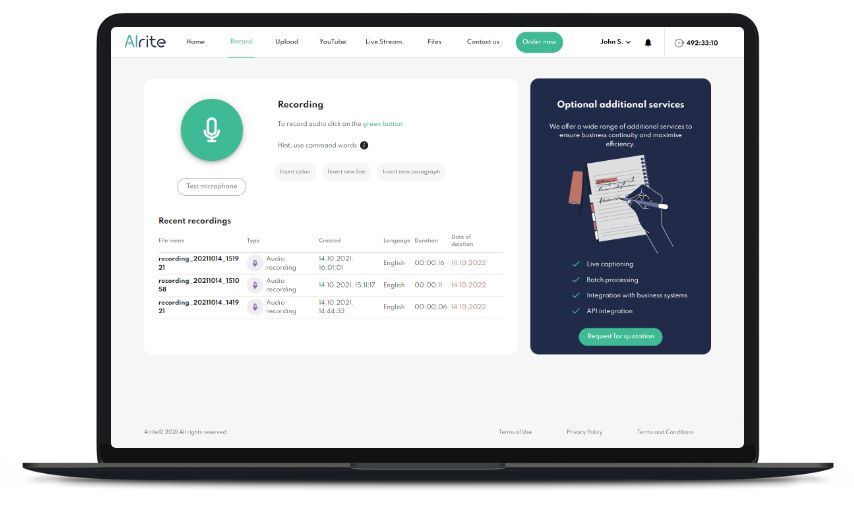
Alrite speech to text web app 'Recording' screen

Spune-l, nu-l tasta! AI-ul nostru de conversie a vorbirii în text transformă instantaneu cuvintele tale rostite în text

AI-ul nostru de conversie a vorbirii în text îți permite să dictezi fără efort, eliminând necesitatea tastării manuale. Textul dictat este scris și punctuat automat cu o precizie remarcabilă, astfel încât poți transforma discursul tău în text oricând.

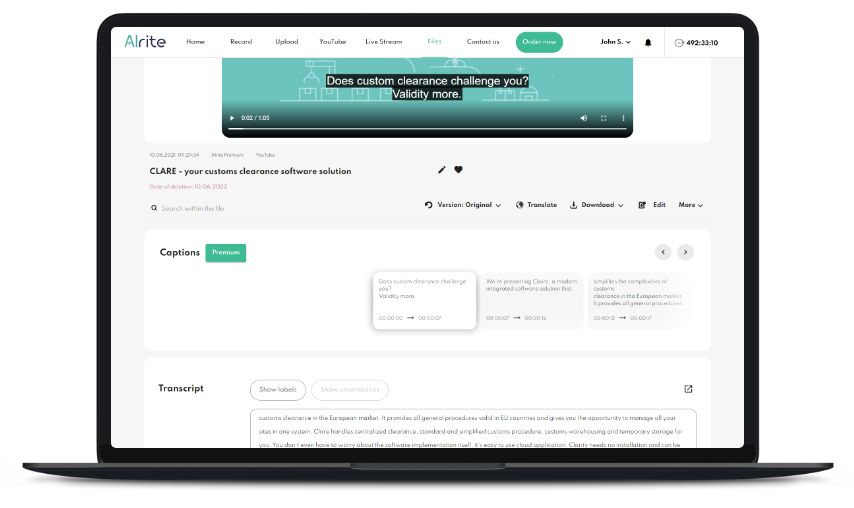
Alrite speech to text web app 'Captions' screen

Creează subtitrări perfecte folosind conversia vorbirii în text alimentată de AI

Alrite asigură crearea fără probleme a subtitrărilor cu precizie perfectă a cuvintelor. AI-ul nostru generează automat fișiere de subtitrări (.srt, .vtt) sincronizate cu precizie la milisecundă, pregătite instantaneu pentru utilizare profesională.

Alrite speech to text web app 'Captions' screen
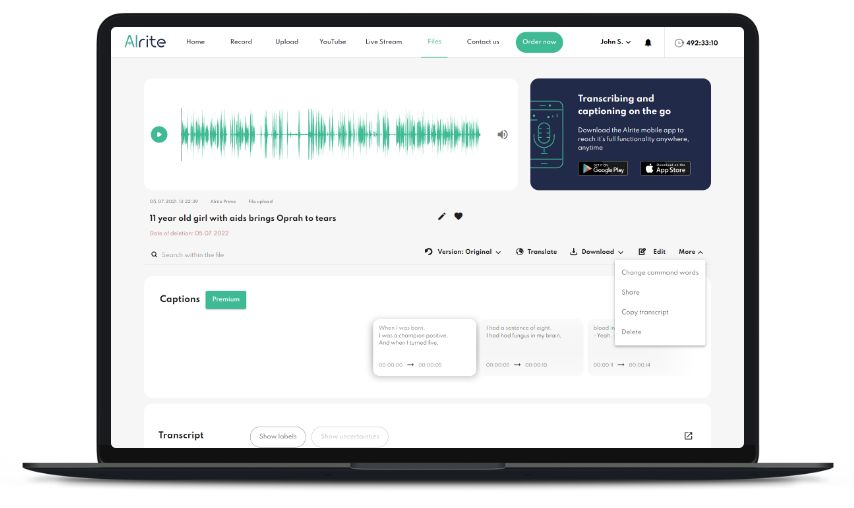
Alrite speech to text web app 'File data sheet' screen

Folosește funcționalitatea extinsă a Alrite, de la conversia vorbirii în text până la traducerea și partajarea automată

AI-ul de conversie a vorbirii în text al Alrite oferă o soluție completă cu transcriere intuitivă și editare de subtitrări, permițându-ți să ajustezi textul fără efort. Cu traducere integrată, subtitrări încorporate, multiple opțiuni de descărcare și căutare avansată, poți crea, gestiona și partaja transcrieri și subtitrări în doar câteva clicuri.

Creșteți-vă eficiența cu Alrite de la doar {{pricing.Lite}}/minut

Oferim pachete cu reducere pentru uz individual, astfel încât să fie accesibile tuturor! În plus, poți testa conversia vorbirii în text și multe alte funcții cu pachetul Starter. De asemenea, dacă găsești Alrite foarte util, poți face upgrade în orice moment la unul dintre pachetele noastre cu funcționalități extinse!

Gratuit

icon for video captioning

Starter

Primiți 30 de minute după înregistrare + 30 de minute reînnoite lunar

icon for video captioningTranscriere


Pachetul Starter include:

  • Transcriere folosind încărcarea fișierelor audio și video
  • Transcriere prin dictare
  • Transcrierea videoclipurilor online
  • Spațiu complet de lucru pentru editarea transcrierilor și subtitrărilor
  • Stocarea fișierelor și a versiunilor text timp de 7 zile

{{pricing.Lite}} /minut

icon for video captioning

Lite

Faceți tastarea fără efort cu Alrite, soluția dvs. versatilă de transcriere bazată pe AI!

icon for video captioningTranscriere

Tot ce este inclus în pachetul Starter plus:

  • Stocarea fișierelor audio și text timp de 1 lună
  • Traducere

{{pricing.Plus}} /minute

icon for video captioning

Plus

Îmbunătățiți-vă conținutul cu capabilitățile de subtitrare fără efort ale Alrite!

icon for video captioningTranscriere
icon for video captioningSubtitrări


Totul în pachetul Lite plus:

  • Subtitrare video
  • Stocarea fișierelor și a versiunilor text timp de 6 luni
  • Transcriere și subtitrare a videoclipurilor online
  • Subtitrări încorporate
  • Rezumat și generare de cuvinte cheie

Prețurile afișate sunt valabile pentru abonații privați. Pentru utilizare de afaceri, consultați pachetele Prime, Premium și Professional!
Modelele de recunoaștere a vorbirii pentru suedeză, italiană, română și poloneză includ software dezvoltat de Max Bain.

Întrebări frecvente

ÎNREGISTRARE ALRITE PENTRU UTILIZATORI INDIVIDUALI

Cum mă pot înregistra pentru aplicația Alrite de conversie voce‑text?

La înregistrare, toți noii utilizatori Alrite primesc un pachet Starter gratuit pentru a testa funcțiile de bază ale aplicației.


Te poți înregistra prin pagina de înregistrare a aplicației Alrite de conversie voce-text sau prin aplicația mobilă gratuită Alrite (Android, iOS):

  1. Creează-ți contul Alrite: Înregistrează-te gratuit pentru afaceri sau pentru uz individual.

  2. Confirmă-ți înregistrarea: Alrite va trimite un e-mail la adresa de e-mail înregistrată pentru a confirma înregistrarea (verifică și folderele de spam). Te poți conecta și cu un cont Facebook sau iCloud.
  3. Autentificare: odată înregistrat, poți folosi aplicația web și mobil Alrite oricând.


Ce ar trebui să fac dacă nu găsesc e-mailul de confirmare a înregistrării pentru Alrite?

Dacă nu găsiți e-mailul de confirmare trimis atunci când v-ați înregistrat în aplicația Alrite de conversie voce-text, verificați folderele Actualizări, Promoții, Spam și Mesaje nedorite, deoarece acesta ar fi putut fi sortat automat acolo de clientul dvs. de e-mail.


Dacă e-mailul de înregistrare Alrite nu se află în niciunul dintre aceste subfoldere, vă rugăm să ne trimiteți un e-mail direct la support@alrite.io pentru a autentifica contul creat la înregistrare.

FUNCȚIONALITĂȚILE ALRITE

În ce limbi aplicația Alrite suportă recunoașterea vocală?

The Alrite speech to text automated transcribing app currently recognises {{supportedLanguages}}.

Before voice recording or file upload, you can specify the language of the speech in the file, and the Alrite speech recognition AI will then produce the text.

It is important that the correct language is selected, otherwise the system will not recognise the speech and no transcript will be generated.

What features are available in the Alrite speech to text app?
  1. Automatic conversion of audio and video material into text
    Depending on the language of the speech in the dictated audio, uploads and social media videos, the Alrite speech to text AI converts the speech into text. The system indicates in the text with a thought mark when it detects a change in the speaker’s identity. Transcripts generated in the Plus package can be summarized with a single click (built in feature provided by Open AI).
    • Recording
    • File uploading: upload media files with a wide range of file extensions (.mov, .mp4, .ogg, .wmv, .webm, .wav, .mp3, .opus, .m4a, .wma)
    • Social media processing: By inserting a simple URL link you can process various social media videos, e.g. YouTube, Facebook watch, TikTok, Dailymotion.
  2. Automatic captioning, caption burning with a unique display
    In the Plus package with extended functionality, in addition to the transcript, captions are also generated, which can be downloaded as a text file in .srt or .vtt format, or exported burned onto the video with a customizable display. The monthly renewal Starter and the Lite package do not include the video captioning and captions burning functions. Only the first 2 minutes of files processed in these packages are captured as a video subtitle to test the feature, which can be saved in .srt and .vtt formats.
  3. Automatic translation
    Audio files and videos processed with Alrite can be translated into other languages with a single click
  4. File export
    • Transcript: You can download the transcripts generated with the Alrite speech to text app, the edited text versions and the automatically translated versions in Word-compatible .docx format without timestamps. The Alrite business packages include a version with timestamps that is displayed by each paragraph, this format is best for interviews and meeting minutes.
    • Videocaptions: All versions – the automatic captions which has timings generated by Alrite, as well as custom captions that include blocks of edited timings – can be downloaded separately in .srt and .vtt formats. The Plus subscription package with video captioning functionality can also be exported in .mp4 format, with a custom look burned onto the video. The video subtitle is produced for the full length of the file only in subscription packages with this feature, for other packages a 2 minute subtitle is produced to test the subtitling and can be downloaded as a subtitle file in .srt and .vtt formats.
    • Video: the video can be downloaded with embedded captions (only some external media players display subtitles, e.g. VLC) or with burned-on captions in .mp4 format. Exporting video with burned-in captions is only available within the Plus subscription package.
    • Audio file: Audio files recorded directly with the app, uploaded audio files and audio files automatically created when processing videos can be downloaded in .mp3 format.
  5. In-app editing
    Transcripts can be reviewed directly in the application, keeping the timing of words. Simply click on a word in the transcript, the player jumps to the exact point where the phrase appears in the recording so you can easily overwrite the misrecognised words.
  6. Video caption editor tool
    With the Plus subscription package (that includes video captioning), you can not only edit the text generated from the audio or video, but also change the blocks, timings and deletion of the video captions.
  7. Complex searchable archives
    In the Alrite speech to text app, you can search for a specific phrase in the content of all media files, filenames and related text versions – original, edited and translated versions of transcripts and captions – at the same time. Key moments of meetings, interviews or document films can be revisited at any time. Archives that make it easy to work with your media are available for the time specified in your subscription or until you delete the files.
  8. Multi- actions
    From the Files menu, you can download all versions of the selected files’ transcripts and captions (original, edited and) at once.
  9. Live captioning
    You can watch live broadcasts of English, German and Hungarian channels on the Alrite live captioning DEMO page with realtime captions as test Alrite’s live speech captioning in real time. As part of the Professional package offers automatic captioning of events and live streaming programmes as an extra service.
What is the difference between transcription and captions?
  • A transcript is a read-along text with punctuation automatically generated from speech.

  • The captions are the timecoded text versions of the speech, matches the media and usually being used to support accessibility of the video.

The automated transcription function is part of all individual Alrite subscription plans.

Captioning, caption editing and burned-in captions features are available in the Plus subscription package that include video captioning function. With other subscriptions you can try out the automatic captioning function on the first 2 minutes of each file.

ALRITE SUBSCRIPTION PLANS (FOR PERSONAL USE)

How can I subscribe to the Alrite app?

You can subscribe to the Lite package optimised for automatic transcription, and the Plus package – designed for transcribing and video captioning in the Alrite speech to text web application.

After logging in to the web application, you can place an order by clicking on the ‘Subscribe’ button in the top menu bar. After slecting the subscription plan and specifying the timcredit, you can choose from several payment options (credit card, PayPal transfer).

Individual users can order the related subscription plans from the Alrite mobileapp as well. All subscriptions require a minimum order of 5 hours (in case of individual subscriptions) of timecredit that you can use in 1 year.

What are the individual Alrite subscription package fees?

For individual subscribers, we offer various subscription packages with different functionalities:

  • For automatic transcription of audio and video material, we recommend the Lite package, which costs {{pricing.Lite}}/minute.
  • The Plus package, which includes video captioning, is available for {{pricing.Plus}}/minute.

The minimum subscription time credit is 5 hours (in case of individual subscriptions), which can be used at any time within 12 months.

How long can the purchased time frame be used?

The timecredit ordered can be used within 1 year, at any time, there is no monthly subscription obligation in Alrite.

If you need more time during the subscription period, you can purchase additional time with a new order.

If you order again before the end of the subscription period, before your time credit runs out, the remaining credit from the previous subscription will be automatically added to the new one, and its usage time will be extended, valid for 1 year from the date of the new purchase.

What is the difference between the Lite and Plus speech to text package?

The difference between the Lite and Plus packages for private use is the captioning feature.

  • The Lite subscription package is recommended for automatic transcription of audio and video material. Files processed in the Lite package and their associated text versions are stored for 1 month.
  • The Plus package with extended functionality is recommended for transcription and video captioning. The Plus package includes all the functionality of Lite, in addition to that it has the summary generation, automatic video captioning, caption editing, caption burning, and extended automatic machine translation functions.
    Files processed in the Plus package are stored in the account for 6 months.

AI AND SPEECH TO TEXT​

How does Artificial Intelligence work?

Artificial intelligence can be briefly described as combining large amounts of data with fast, iterative processing and intelligent algorithms, allowing software to learn automatically from patterns or features in the data.

What is AI?

AI is short for artificial intelligence, which is the ability of machines to sense their environment, deal with what they detect and solve problems. Natural language processing and speech recognition, for example, are some specific applications of AI.

How can AI be used for transcription?

A branch of artificial intelligence is speech recognition technology, which is used by companies in many business areas to support digitalization and speed up workflows.


Solutions such as the Alrite speech to text app can automatically recognize speech and generate text from it, which is the essence of automatic transcription systems.

What is transcription used for?

Transcriptions can make recorded materials such as interviews and meetings, phone calls readable, retrievable so in this form it is easier to analyze them. Transcripts and captions support the deaf and hard of hearing by making the audio and video content accessible. Furthermore, adding text to video content increases SEO ranking too.

Transcription is used in many different areas, for example it is a helpful tool for journalists in the media sector for recording and processing interviews. It helps saving loads of time in the social and governmental sector by automatically generating minutes of the general assembly. Speech to text solution is popular in the academic life among researchers in complying their qualitative analysis of interviews.

Can’t find the information you are looking for?

The best speech into text AI always in your pocket

Do not lose any piece of information ever. Take the Alrite mobile app with you everywhere.

Allow our speech into text AI to make your life easier and more efficient. You can also try one hour of the Alrite voice to text AI for free, whether it is audio transcription or automatic video captioning, we offer you the whole palette.

Woman using speech to text app